
Inventory, Purchasing & Receiving
Integrators were tracking millions of dollars in equipment across spreadsheets, whiteboards, and sticky notes because our software didn't have an inventory tool. Existing customers were frustrated, and larger integration firms were walking away during sales demos because we couldn't answer a basic question: "Where do we track warehouse stock?"
I led product design for our inventory system, connecting purchase orders directly to active jobs and service vans so teams always knew what was in stock, what was spoken for, and what was arriving tomorrow.
At a glance
- The Problem: Customers spent hours every week manually checking stock between spreadsheets and third-party tools. Enterprise deals stalled during pilot demos because we couldn't track hardware past the initial purchasing stage.
- What I Built: A connected inventory ledger linking purchase orders directly to warehouses, job sites, and field vans. Receiving updated the inventory database immediately. In the MVP, other open client views used a manual refresh rather than live streaming updates. We held back barcode scanning and automated reordering for v2 to make sure baseline stock counts were completely reliable first.
- The Result: The release unblocked stalled enterprise deals during pilot demos by proving we could track warehouse hardware end-to-end, contributing to an 18% increase in company-wide MRR over the following year.
Problem
Every Monday morning, project managers and warehouse leads were stuck playing detective: comparing packing slips against handwritten notes and Excel tabs to figure out where 20 high-end amplifiers had disappeared to. If our software couldn't tell them whether an item was sitting in the main warehouse or already loaded on a technician's van, they had to rely on separate tools or call someone on the phone. For enterprise buyers, not having that built-in was an immediate dealbreaker.
Objectives
- Stop teams from having to double-enter equipment into external spreadsheets
- Connect receiving docks directly to job schedules so PMs know when parts arrive
- Give warehouse managers clear visibility into low stock before job sites stall
- Make checking items in fast enough that installers don't bypass the system
Research Insights
I mapped how teams tracked inventory outside the product, usually across spreadsheets or paid tools like Jetbuilt. One power user maintained a master spreadsheet with 14 tabs: one per project, plus cross-reference sheets, reconciliation logs, and a manual low-stock tracker highlighted in yellow. It took her two hours a day to keep current, and decisions were still made from stale data.
Across 6 user interviews and workflow mapping sessions, the pattern was consistent:
- Time sink: 2–3 hours/day reconciling stock; user-reported roughly 15–20% error rates
- User split: Small AV shops needed fast confidence in quantities, while larger teams needed asset‑level traceability for accountability
- Market signal: Integrated inventory was table stakes in enterprise deals
Defining Decision
The easiest option was building a standalone stock list that teams updated manually at the end of the week. But that would have just created another spreadsheet inside our app. Instead, I pushed to connect inventory directly into our purchasing and project workflows.
It meant a larger scope and more cross-team coordination, but it solved the root problem: the second someone checks in a box on the receiving dock, the quantities update immediately for the project manager planning tomorrow's install.
Legacy spreadsheet workflow
Teams spent 2–3 hours daily reconciling counts across 14+ tabs, making costly project purchasing decisions from stale data.
Third-party tool tax
Paying for separate tools like Jetbuilt created duplicate data entry, disconnected project costs, and frequent tracking errors.
Unified inventory platform
A single source of truth connecting POs directly to job allocations, cutting manual reconciliation and surfacing stock risk early.
System Model & Tradeoffs
The core design challenge was defining how an item moved across its lifecycle. A flat stock count fails operational teams because it doesn't explain what can actually be used today. We structured inventory around three sequential lifecycle stages, alongside an independent threshold warning for low stock:
Tradeoffs: Real-Time Sync vs. Shipping on Time
I originally advocated for full WebSocket-driven, bi-directional live sync across all client sessions. If an installer checks out equipment in the warehouse, every PM's screen should reflect it instantly.
However, our engineering team evaluated the backend requirements and found a true real-time streaming infrastructure would push our MVP launch back by several months. To hit our December deadline and unblock pending enterprise sales, the PM and I compromised: the database updated immediately on receiving, but client views used a prominent manual refresh/sync trigger paired with contextual state badges. To prevent allocation race conditions when two project managers staged the same physical stock before refreshing, we implemented optimistic concurrency validation at the API layer. The UI validated available quantities upon submission, displaying an immediate conflict resolution toast if another user claimed the units seconds prior. It wasn't the instantaneous sync I originally drew up, but it protected our launch date, kept the database reliable, and solved the actual customer problem without dragging the project out for months.
Balancing Fast Receiving with Serialization Audits
During discovery, we hit a clear split: small residential shops wanted fast, friction-free quantity counts, while commercial enterprise clients demanded rigorous, asset-level serialization for high-value equipment. Forcing serial numbers on small shops would kill adoption; omitting them would lose six-figure enterprise contracts.
I designed a dual-track UX: Quantity-first by default for everyday rapid receiving, with an optional asset-level tracking layer for serialized items and warranty audits. That choice kept check-ins fast for small operators while giving enterprise procurement the serialization audit trail they needed to sign contracts.
Quantity-first default: Zero required modals. Installers tap once to confirm bulk arrival and immediately load vans for the day.
Asset-level audit layer: Enforces serialization for high-value equipment without slowing down routine commodity receiving.
Reusing component patterns
We had a tight 12-week window to get this into customer hands before year-end. Because we could pull data tables, modals, and status badges straight from the component library I had established across D-Tools Cloud, our front-end engineers didn't have to build custom UI elements from scratch. That shaved weeks off development and kept bugs to a minimum during a fast-paced sprint.
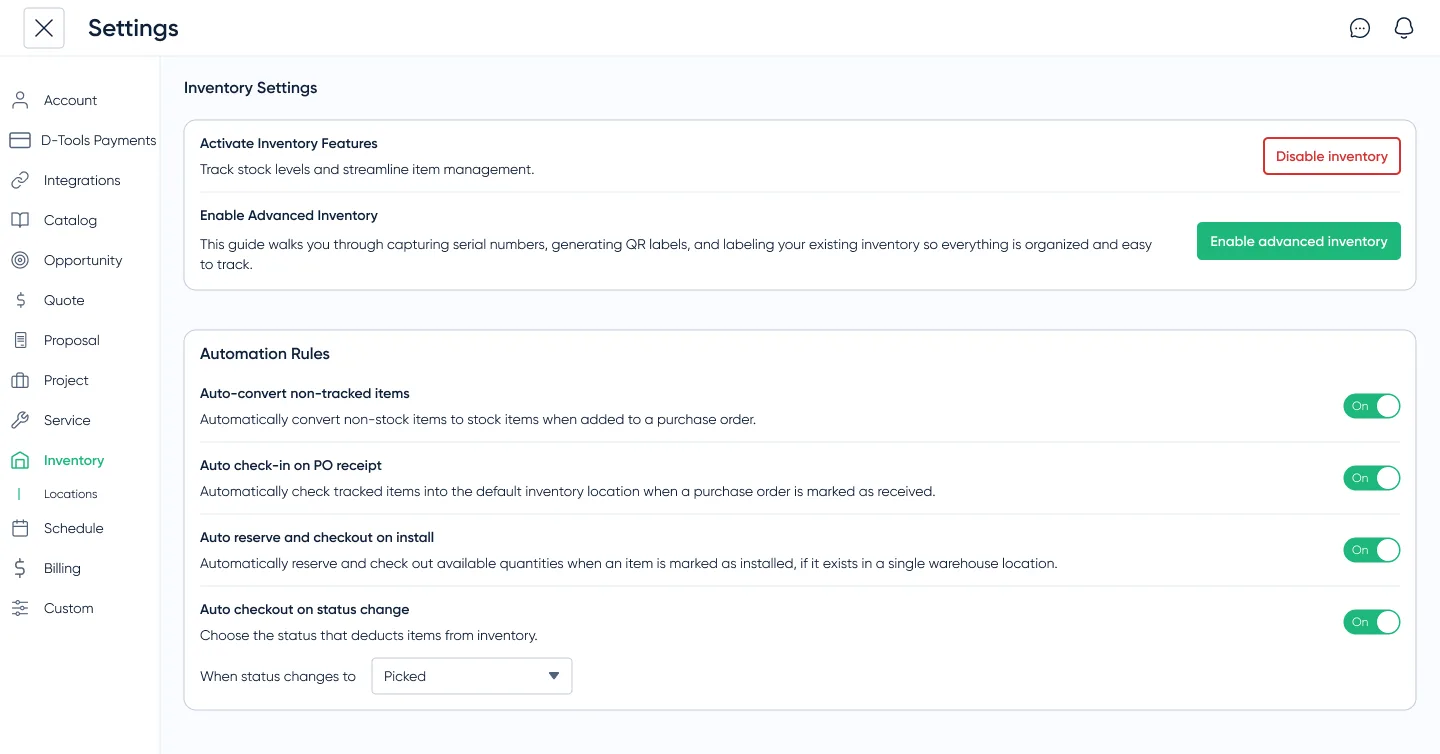
Prototyping & Validation
I led three rounds of prototype testing with six active customers across both shop profiles. In Round 1, our combined receiving flow forced users through serial-number modals, causing small operators to abandon the flow in frustration.
By Round 3, separating fast bulk check-ins from deep serialization paid off: small shops could receive a delivery in thirty seconds, while commercial teams still had the audit trail they needed for warranty tracking.
Impact
The system replaced scattered notes and spreadsheets with one verified count across the company, saving managers hours of weekly reconciliations.
One customer uncovered thousands of dollars in unused equipment sitting in forgotten corners of their shop, proving how much hardware gets lost in disconnected workflows.
Before this release, larger integration firms were walking away during sales demos because we couldn't answer a basic question: "Where do we track warehouse stock?" Delivering verified inventory tracking directly unblocked stalled enterprise accounts during pilot walkthroughs, drove an 8% year-over-year adoption growth across active customer accounts, and contributed to an 18% increase in company-wide MRR over the following year.
Lessons & Next Steps
In warehouse software, trust is binary. If a technician drives to a job site and the four switches the app said were in stock aren't in the van, they stop using the app and go back to pen and paper. This feature succeeded because every number explained its history: where the item came from, which project had it claimed, and when the replacement was arriving.
- What comes next: Once teams trusted the baseline counts, the next logical steps were mobile barcode scanning in the warehouse and auto-generating reorder POs when stock hits minimums. We held those back from the MVP on purpose to make sure the foundation was rock-solid first.
i4cp Member Portal & Research Discovery
Redesigning enterprise HR research discovery across a four-level content taxonomy, elevating Ahri AI, and doubling daily member engagement.